Microsoft Teams
Archlynk
  • Supply Chain Planning & Execution

    Agile Supply Chain

    SAP Integrated Business Planning

    SAP Transportation Management

    SAP Extended Warehouse Management

    SAP Business Networks for Logistics

  • Global Trade Services

    SAP Global Trade Services

    SAP S/4HANA for International Trade

  • Time-to-Value Solutions
  • Accelerators & Innovations

    Parcel Shipping Accelerator

    p44 Visibility Accelerator

    Loadsmart Freight Network Accelerator

    Supply Chain Portal

    Last-Mile Suite

  • Resources

    Insights

    Blog

  • About Us

    About ArchLynk

    Leadership

    Careers

    News & Events

    Contact Us

  • Home
  • > Blog
  • > How SAP GTS and EWM enforce customs requirements on your warehouse floor (Part 2)

Related Content

How SAP GTS ensures you meet legal requirements across all your customs import processes. (part 1)

READ MORE

ArchLynk (SAP GTS E4H) - Assessment Utility

DOWNLOAD NOW

SAP GTS Edition for SAP HANA

DOWNLOAD NOW

Blog - Transforming Warehouse Operations with SAP EWM

CLICK HERE

How SAP GTS and EWM enforce customs requirements on your warehouse floor (Part 2)

Thought Leadership 07/10/2026

Share post:

share share share dots
Copied!

In Part 1, we explored the legal context and integration scenarios for SAP GTS and SAP S/4HANA. This second part focuses on the operational flow after goods receipt: how import declarations are handled and how the putaway process works technically when EWM joins the picture.
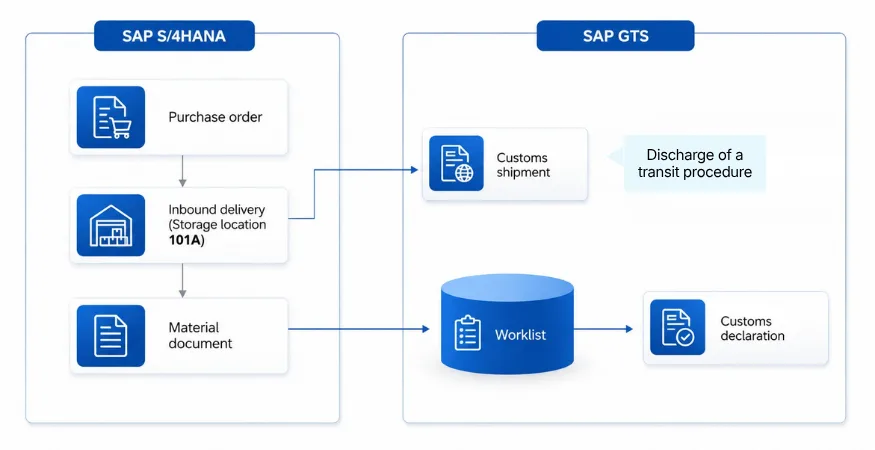
Import Declaration After Goods Receipt – Without vs. With SAP EWM

When SAP EWM is not part of the process, the inbound delivery in SAP S/4HANA triggers a customs shipment in SAP GTS to discharge the transit procedure in case of duty unpaid goods movement. After posting the goods receipt (movement type 101), a material document is created and transferred to GTS. From this document, GTS generates the import declaration and submits it electronically to customs. Once declared, the goods are available for picking immediately—there is no warehouse-level control.
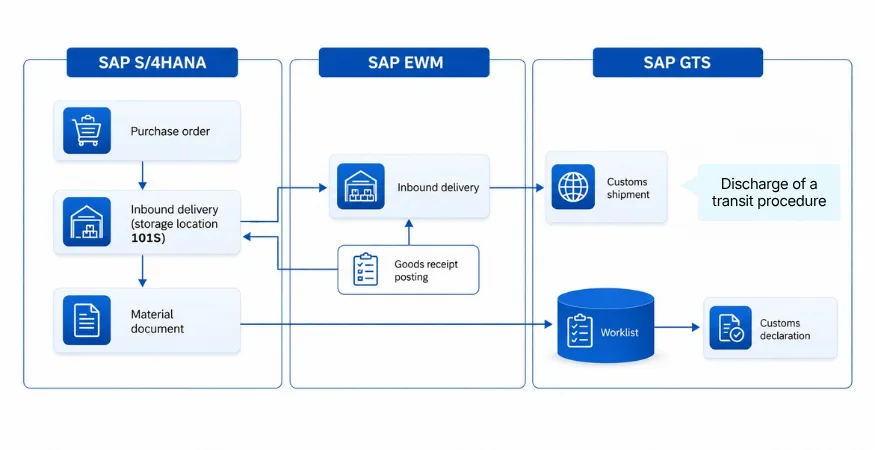
When SAP EWM is integrated, the process changes significantly. The inbound delivery is distributed to EWM, creating an EWM inbound delivery. The MRN (Master Reference Number) of the transit procedure is entered in EWM, and the system assigns stock type C, meaning the goods are customs-controlled and blocked. They cannot move or be picked until they are declared under a customs procedure. Once GTS confirms that the goods are released for the chosen customs procedure, EWM updates the stock type to F = Free, lifting the block and enabling picking and outbound processes. This integration ensures compliance by preventing unauthorized movements of non-Union goods.

Note: This article focuses on import declaration after goods receipt. SAP GTS also supports declaration creation based on the purchase order or inbound delivery, which are standard scenarios but not covered here. Additional Integration: SAP TM (Transportation Management) can also be integrated into this process for planning and execution of inbound freight, providing end-to-end visibility from transport planning to customs clearance and warehouse operations.

Interaction Between SAP GTS and EWM

The integration relies on real-time communication via RFC calls. GTS sends an arrival notification to customs and waits for the unloading permission. When permission is received, GTS updates the customs shipment status and triggers EWM to release the inbound delivery. Only then can warehouse operations proceed: unloading, goods receipt posting, and putaway. This technical handshake between systems guarantees that logistics execution aligns with customs law and prevents premature handling of goods.
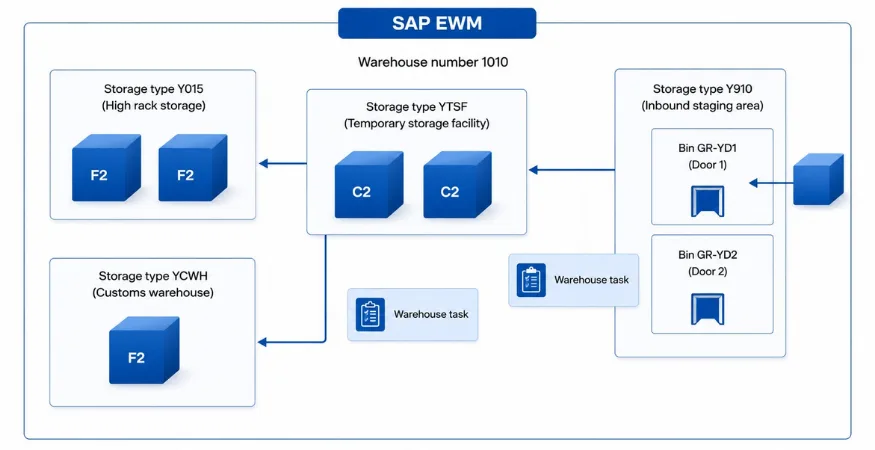
Technical Flow of the Putaway Process

Once the block is lifted, EWM executes the physical and system steps:

  • Inbound Staging Area: Goods arrive at a door bin (e.g., GR-YDI1 in storage type Y910).
  • Temporary Storage Facility: A first warehouse task moves goods to storage type YTSF.
  • Customs Warehouse: After customs release, a second warehouse task transfers goods to storage type YCWH.

Key technical points:

  • Stock Type Logic: Initially C (blocked, customs-controlled). After customs declaration and release → F (Free), enabling picking and outbound processes.
  • Confirmation: Tasks are confirmed via RF devices or manually in the EWM monitor.
  • Customizing Essentials: Storage types for temporary storage and customs warehouse; Warehouse process types for transfer postings and stock type changes; Integration settings for document transfer between EWM and GTS.

Why This Matters

Integrating SAP GTS and EWM is not just a technical exercise—it enforces customs compliance at the operational level. By blocking movements until customs clearance and automating stock type changes, companies reduce risk, improve efficiency, and maintain full traceability from border to bin. Adding SAP TM to the mix extends this integration to transportation planning and execution, creating a truly end-to-end process.

Previous Post Next Post

Related Content

How SAP GTS ensures you meet legal requirements across all your customs import processes. (part 1)

READ MORE

ArchLynk (SAP GTS E4H) - Assessment Utility

DOWNLOAD NOW

SAP GTS Edition for SAP HANA

DOWNLOAD NOW

Blog - Transforming Warehouse Operations with SAP EWM

CLICK HERE

ArchLynk
Contact Us
Services
Supply Chain & Global Trade Consulting Application Management Services SAP S/4HANA Cloud SAP Advanced Planning and Optimization
SAP S/4HANA Migration SAP Analytics Cloud SAP Yard Logistics SAP Business Technology Platform
Innovations
AI & ML (SAP TM + ShipEngine) Parcel Shipping Accelerator (SAP TM + Loadsmart) Freight Network Accelerator Carbon Management Solution ChatBots Tendering Award App
API & Middleware (SAP TM + p44) Visibility Accelerator Shipment Execution App Instant TM Carrier Ranking Report
About Us
Leadership Team Our Customers Locations
Careers (We're hiring!)
Contact Us
+1-866-960-9605

Privacy Policy Impressum / Legal Notice Cookie Preferences

© 2026 All rights reserved by ArchLynk